← BFi53ER0 / BFi53ER0S EdgeRouter EdgeRouter firmware · Battery-Free Bluetooth Gateway

Self-powered switches and sensors, onto your IPv4/IPv6 network.

A PoE-powered DIN-rail gateway that receives Bluetooth LE telegrams from battery-free switches and sensors and delivers them as JSON over UDP (IPv4 and/or IPv6) or a TCP feed — no broker, no cloud. A built-in live dashboard at http://bfi53er0-xxxx.local/ — the name printed on the label — shows every device as it is heard; settings are password-protected and answer the local network only. In the same DIN-rail box: a Modbus gateway, field I/O and microSD logging — one gateway instead of several.

Used in: Assistive Help Call for Care, Healthcare & Schools · Factories & Infrastructure · Commercial Buildings & Hotels
PTM 215B / 216B · STM 550B · EMDCB JSON over UDP & TCP Modbus TCP · RS-485 · field I/O PoE+ or 14–32 V DC
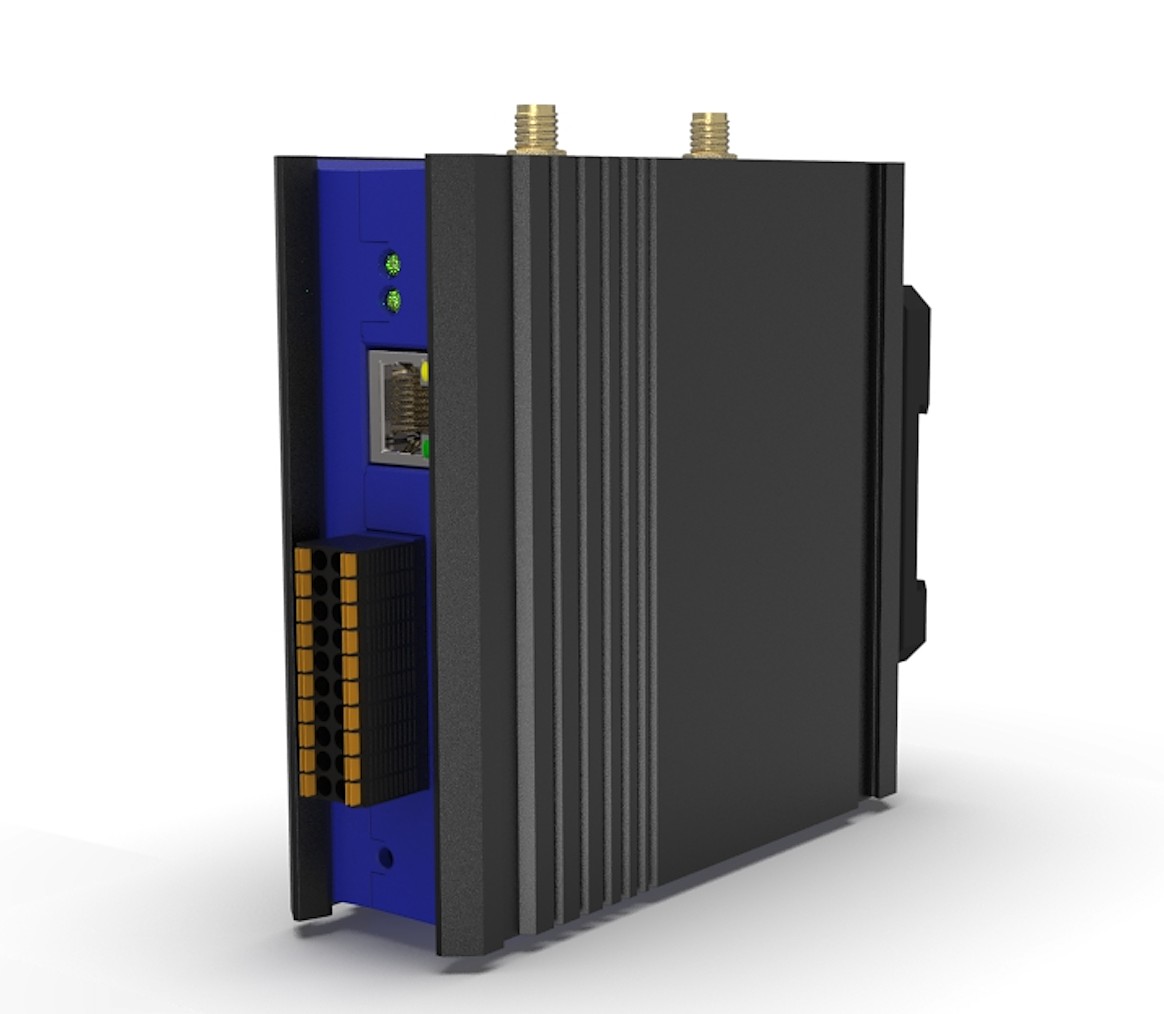
BFi53ER0 gateway, terminal side: SMA antenna connectors, status light, RJ-45 and terminal block on an extruded aluminium body Rendering. Production enclosure is black-plated extruded aluminium.

46 msair heard to handed to the network, average, measured (firmware 0.57.43)
3 channelsall three Bluetooth advertising channels, listened to continuously
256devices tracked at once (planning figure) — up to 48 with names, places and allow/block lists (firmware limit)
0 setupfound by the name on its label; sends to link-local multicast and broadcast by default
Where it is used
Commercial buildings
Hospital room
Hospitality & healthcare
Retrofit projects
Retrofit projects
What it does

It reports what it heard, and sends it on.

The gateway listens on the three Bluetooth advertising channels all the time, merges the copies of each telegram into one, and forwards it with the signal strength and a count of any telegrams from that device that never arrived. It holds no device keys: decoding and authentication belong with the system that consumes the telegrams.

Battery-free capture

  • EnOcean Bluetooth LE: PTM 215B / 216B switches, STM 550B multisensor, EMDCB motion and light sensor
  • Copies from the three advertising channels merged into one telegram
  • RSSI and a lost-telegram counter on every telegram, from the device’s own sequence number
  • Devices are listed by being heard — no pairing, no key entry
  • Need battery-free devices inside a Bluetooth Mesh / NLC network instead? The BFi53ER0-MB firmware translates them into Mesh models

Delivery

  • One JSON object per telegram over UDP, IPv4 and IPv6 or either one
  • Each family with its own destination and port — or display-only, nothing sent; a receiver on Wi-Fi should use a unicast destination or the TCP feed
  • TCP feed, one JSON object per line; with a microSD card fitted, a client that connects first receives what it missed, then the live stream, in order.
  • Every source, an allow list, or everything except a block list; optional name, place and coordinates on each telegram
  • The allow or block list governs every output: UDP, the TCP feed and the catch-up from the microSD card

On the local network

  • Settings in eight tabs — overview, network, forwarding, devices, live view, Bluetooth, security, system — and usable from a phone
  • Open http://bfi53er0-xxxx.local/ — the name printed on the label; no address needed
  • Each gateway announces its own name, so several on one network never clash; any Bonjour browser lists them
  • When its address changes, the gateway announces the new one on the local network, so computers find it by name straight away
  • Built-in live dashboard, decoded in the browser and updated the moment a telegram is heard — ahead of UDP and TCP, which carry it once its repeat copies are in; switch buttons light from press to release
  • Gets its address by DHCP, or assigns one itself on a network without a DHCP server — a laptop on a direct cable is enough
  • Or a static IPv4 address, applied on trial with automatic rollback
  • Works with standard tools: a browser, Wireshark, nc, Python

Security & updates

  • Settings behind a password, changed at first sign-in. Settings, the TCP feed and network firmware updates answer the local network only; the live view can also answer outside the local network — on by default; one switch on the settings page turns it off
  • Commissioning keys stay private: an EnOcean device in commissioning mode broadcasts its AES-128 key, and the gateway never forwards, records or displays it
  • Bluetooth closed by default — opened for 10 minutes from the password-protected settings page, for firmware updates from a phone; only firmware signed for this product runs
  • Signed firmware updates from the web page, with automatic rollback if the new image is not kept — or from a phone over Bluetooth (nRF Device Manager)
  • Settings backup and restore: back up every setting to a file and restore it — onto the same gateway or a replacement — choosing which parts to restore, without the password ever leaving the device. The file carries the Modbus TCP, UDP and RTU-over-TCP settings, the source-address list, terminal I/O settings and switch bindings, the RS-485 gateway and its poll list, time and microSD history settings (firmware 0.57.82, bench)
  • Firmware from a microSD card (firmware 0.57.46): copy the signed image to the card and restart — no network or password needed at the gateway. Newer versions only, each image installed once, the whole file checked before anything is erased, a trial run with automatic rollback, and each gateway’s result written back to the card. On by default; one switch on the settings page turns it off
  • Three update paths — a phone over Bluetooth, the network (web page or tool), or a microSD card. The gateway keeps answering Modbus during an update: the longest pause measured was 23 ms over the network, 36 ms for a page upload and 118 ms over Bluetooth; the microSD update runs at start. Every update runs on trial and returns to the previous image if it is not kept (firmware 0.57.82, bench)

Recording, reliability & recovery

  • microSD ring recorder: the recent past, whether or not anyone was listening
  • RGB status light, one colour per state, brightness set by the owner
  • Watchdog: a stalled or crashed firmware restarts by itself and records why, instead of waiting for someone to pull the power
  • Forgotten password? Press the reset button three times to restore the default password, ten times to restore factory settings — no call to the factory needed

Hardware

  • BANFi BFi53MLG module, Nordic Semiconductor nRF5340 — Arm Cortex-M33 at 128 MHz + 64 MHz, TrustZone, CryptoCell-312
  • 2.4 GHz front end, external antenna on SMA
  • 10/100 Ethernet, PoE+ (IEEE 802.3at) or 14–32 V DC
  • BFi53ER0 terminal block (20-way, 2 × 10): RS-485, 2 analog inputs, 2 analog outputs, 4 digital outputs and 2 digital inputs — terminal layout. BFi53ER0S: terminal assignment to be announced.

Modbus, RS-485 and field I/O, in the same box.

The PLC or SCADA reads the battery-free devices as ordinary Modbus registers, talks to RS-485 equipment through the gateway, and drives the terminals — no packet decoding, no second box. Figures measured on a bench unit, firmware 0.57.82. The register blocks in outline are in the Quick Start, chapter 5; the complete register map is in the System Integration Guide, leave your details to get it.

Modbus TCP server

  • IPv4 and IPv6, port 502; off until turned on
  • Up to 32 masters at once — about 400 requests/s shared evenly, no errors (bench)
  • Also Modbus UDP and Modbus RTU over TCP, both off by default
  • Function codes 01–06, 15, 16 and 43/14

Battery-free devices as registers

  • Every self-powered switch and sensor appears as decoded Modbus registers
  • Switch contacts and press counts; each sensor field — temperature, humidity, light, occupancy, contact — with a valid bit
  • Signal strength and missed-telegram counts per device
  • The PLC or SCADA does no packet decoding

RS-485 Modbus RTU

  • Gateway mode: Modbus TCP masters read and write devices on the RS-485 bus, unit IDs routed to RTU addresses
  • Device mode: a PLC or HMI on the bus reads this gateway
  • 1200–921600 bit/s; RTU and ASCII
  • Read cache and polling: a cached read answers in about 2 ms, against about 43 ms reading through to the bus at 9600 bit/s
  • Change a device’s Modbus address from the settings page, with presets for common sensors and relay boards; the gateway refuses an address already in use
  • Reach modules that leave the factory at address 255, then give them a normal address

Field terminals

  • 4 digital outputs, open collector, for 24 V relays and indicators; a pulse time per output
  • 2 digital inputs, 12/24 V DC, with edge counters and debounce
  • 2 analog inputs, 0–10 V, with linear scaling and high/low alarms with hysteresis
  • 2 analog outputs, 0–10 V, about ±0.1 % of full scale measured on the bench
  • Outputs go to a safe state when the master goes quiet
  • Terminals as on the BFi53ER0 terminal block; BFi53ER0S: terminal assignment to be announced.

Rules: switches and sensors that act

  • On the BFi53ER0, a self-powered switch or sensor drives outputs directly — the gateway’s own terminals and relays on the RS-485 bus
  • No PLC, no master and no network in the path; it keeps working with the network down
  • Up to 64 rules — see below

Access, history and time

  • Per-source-IP access list, up to 8 rules, read-only or read/write; read-only also blocks writes passed through to RS-485 devices
  • microSD history: polled RS-485 registers, terminal states and events as CSV in an 8 MB ring on the card, downloaded from the settings page
  • Time set by a Modbus master or by the signed-in browser

Rules and alerts: a press or a door opening switches something.

On the Rules page you choose a switch or a sensor, say what each of its events does, and tick the outputs it works. The gateway does the rest by itself.

What a rule listens to

  • A battery-free switch: each rocker pressed or released
  • An occupancy sensor: someone there, or the room empty
  • A door or window magnet contact: closed or open
  • Silence: a sensor not heard for the minutes you set — so a sensor that has fallen out of range, or sits in the dark, does not go unnoticed. This suits sensors, which report on a schedule; a battery-free switch sends only when pressed, so silence from a switch means nothing

What it can do

  • Switch an output on or off, toggle it, or switch it on for a set time
  • Put an output back the way it was — a meeting-room light switched on by hand stays on when the room empties
  • Arm or disarm: a rule can be set to act only while armed. Arm from the settings page, a switch, or the building system over Modbus; the state survives a restart
  • After a power cut, each output comes back as you set it: off, on, or as it was before, set per relay module and put back in order (lighting first, pumps last), each module in one write; an output a rule pulses or holds always comes back off, so a restart never leaves a contact closed (firmware 0.57.99, User Manual 11.10)

How many

  • Up to 64 rules per gateway
  • Each rule watches one switch or sensor and gives each of its events one effect; several rules can share one switch
  • Each rule switches up to 16 outputs at once: the BFi53ER0’s 4 digital outputs, plus relay outputs on Modbus RTU relay modules on the RS-485 bus
  • Rules work with the switches and sensors on the gateway’s device list — up to 48
  • The building system can read each rule’s state and acknowledge an alert over Modbus TCP

Examples

  • Light switch: one rocker on, the other off
  • Meeting room: occupied → light on; empty → back to how it was
  • Door alert: door open → beacon on; closed → off
  • Out-of-hours alert: while armed, a door or occupancy event sounds a siren for 3 minutes; a sensor silent for an hour raises it too

Typical groups on one gateway

ApplicationRules per groupHow many groups
Roller blind or shutter with dry-contact inputs (up / stop / down)3up to 21 — or 20, plus one group that sends all of them up, stops or lowers them together
Two-wire roller motor (up / down; stop = both off)2up to 32
Lights or loads, each switched by one switch or sensor1up to 48 (the device list)
Alerts from door contacts and occupancy sensors1up to 48 (the device list)

These are the firmware’s configuration limits (BFi53ER0-BF, firmware 0.57.96 and later), not measurements with a particular motor or load. A group may be one motor, or several wired in parallel as their maker allows. Motor inputs that need dry contacts are driven from relay modules on the RS-485 bus, not from the open-collector digital outputs; a two-wire motor needs an interlock in its wiring or controller. How many modules one RS-485 segment carries depends on their unit loads. BFi53ER0 only; BFi53ER0S terminal assignment to be announced. Full table in the hardware specification v2.9, section 4.4. Wiring examples — the RS-485 bus, a dry-contact roller blind (up / stop / down), a two-wire motor behind an interlock, and a digital output driving a 24 V relay — are in the User Manual, section 11.9; the roller examples have not yet been tried with a motor.

An alert, not a certified alarm system. A radio telegram can be missed and the 2.4 GHz band can be jammed; the gateway is not approved as an intruder or safety alarm, so do not rely on it where life or property depends on it. Battery-free telegrams carry no signature: where it matters, arm and disarm from the settings page or over Modbus, not with a battery-free switch. Details are in the User Manual.

Quick start: find the gateways on your network

From a Mac terminal. Every gateway’s name starts with bfi53er0- and matches its label.

# list the gateways on this network
dns-sd -B _http._tcp
# check that one is online — it answers {"ok":true,…}
curl http://bfi53er0-xxxx.local/api/title
Built-in pages

Open a browser. Nothing to install.

The live view shows a card for every device as the gateway hears it, decoded in the browser. The settings page, behind the password, chooses where telegrams go and which devices are forwarded.
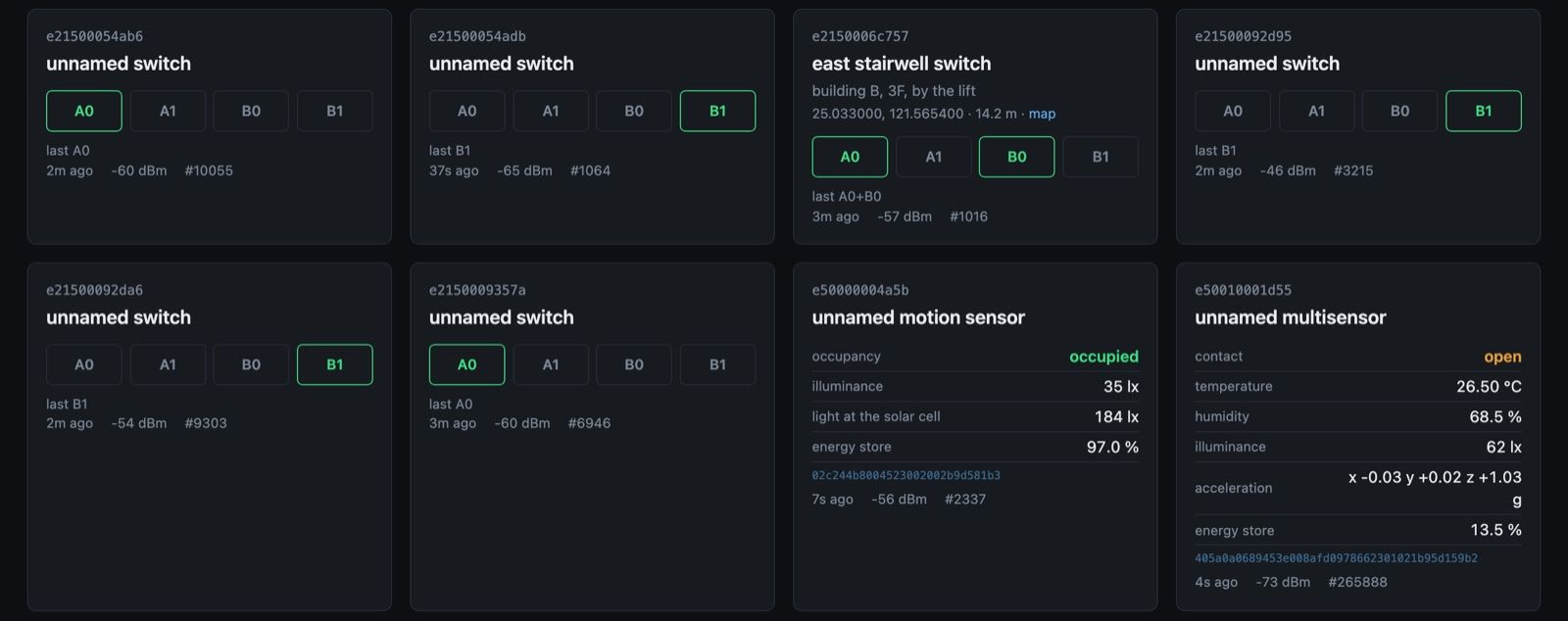
Live view: cards for EnOcean wall switches, a motion sensor and multisensors, each with its readings, signal strength and sequence number
The live view at http://bfi53er0-xxxx.local/, from a working gateway: wall switches with the contact last pressed, an EMDCB motion sensor and STM 550B multisensors, each with signal strength and sequence number.
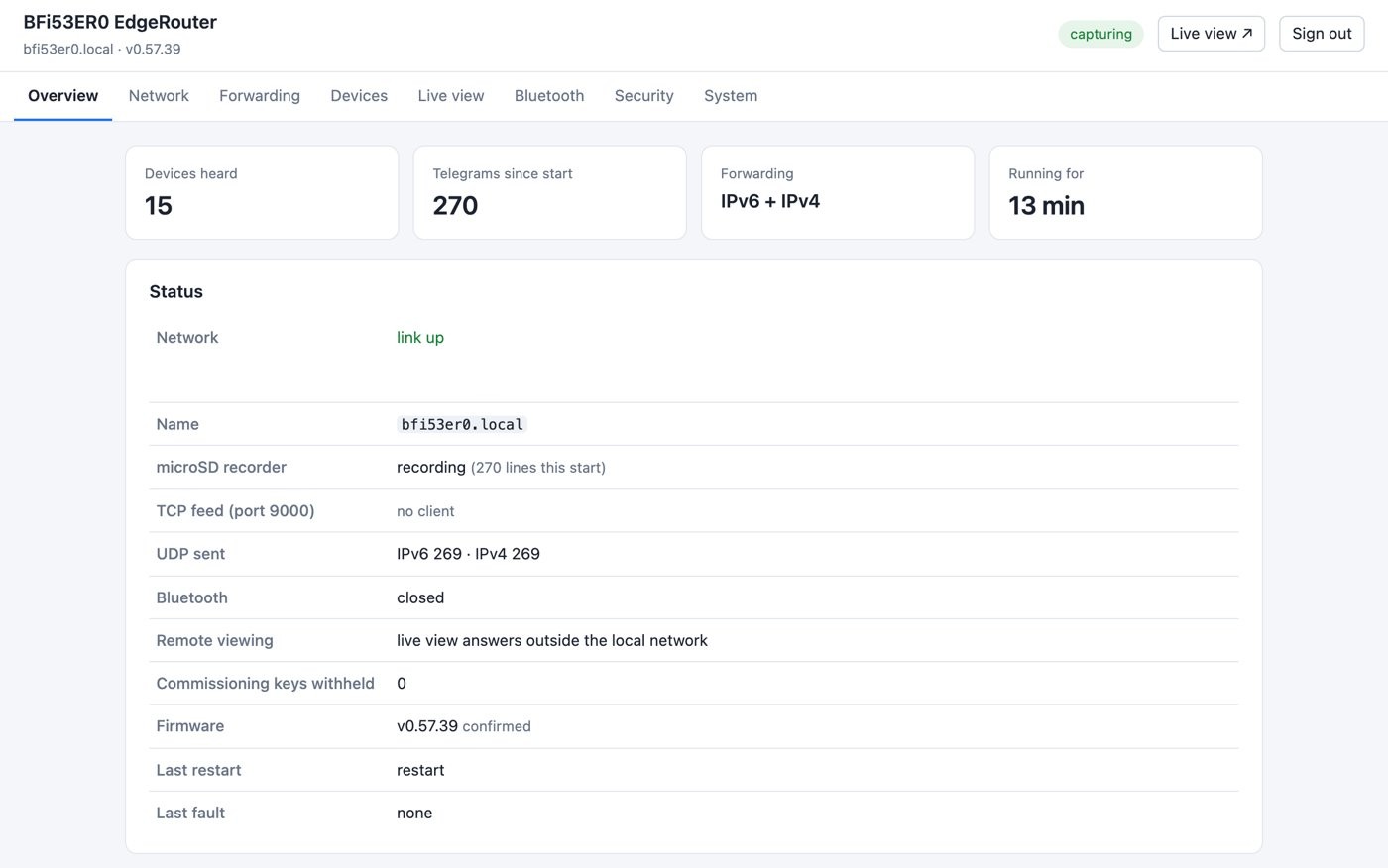
Settings overview: devices heard, telegrams, forwarding, and the status of network, recorder, TCP feed, Bluetooth and firmware
The settings overview: what the gateway hears, where it sends it, and the state of every part at a glance.
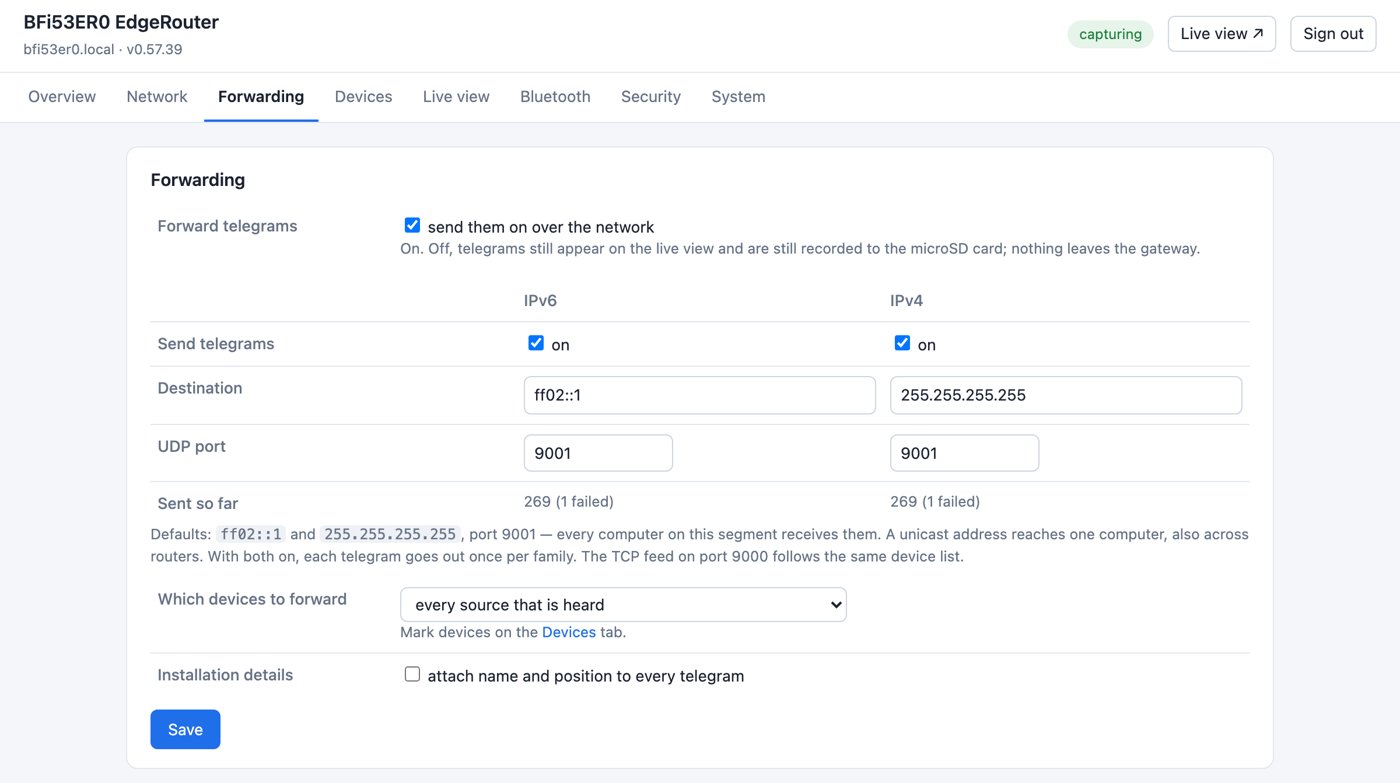
Forwarding settings: IPv6 and IPv4 each switched on with a destination address and UDP port, and a choice of which devices to forward
Forwarding: IPv6 and IPv4 each on or off, with their own destination and port. The defaults, ff02::1 and 255.255.255.255 on port 9001, reach every computer on the segment with nothing configured.
Supported devices

Battery-free Bluetooth devices, working today.

These harvest their energy from a press, from light or from motion, and need no battery. Most are EnOcean’s — a long-standing partner whose Bluetooth energy-harvesting devices this gateway is built around. The gateway forwards every EnOcean Bluetooth LE telegram it hears; the devices below have been captured on the bench — the EMSIB is the same STM 550B in a frame.
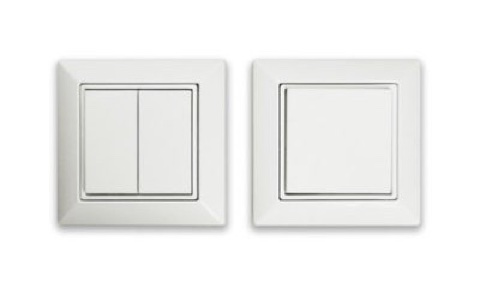
EnOcean Easyfit single and double rocker wall switches

PTM 215B

Kinetic wall switch — the press powers the telegram. Single rocker (2 channels) or double rocker (4 channels).

Reports contact A0, A1, B0 or B1; press or release
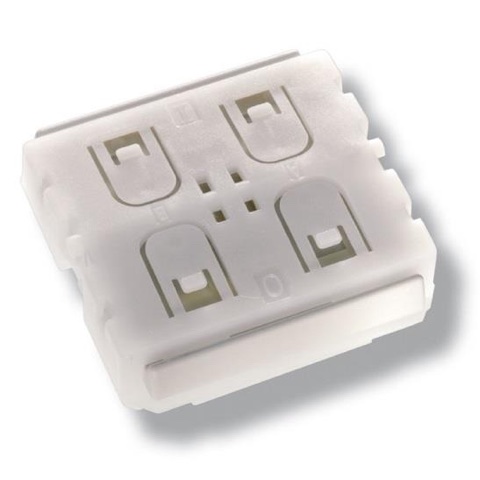
EnOcean PTM 216B switch module

PTM 216B

The same transmitter as a module, for switch makers building their own rocker and frame.

Reports the same telegrams as the finished switch
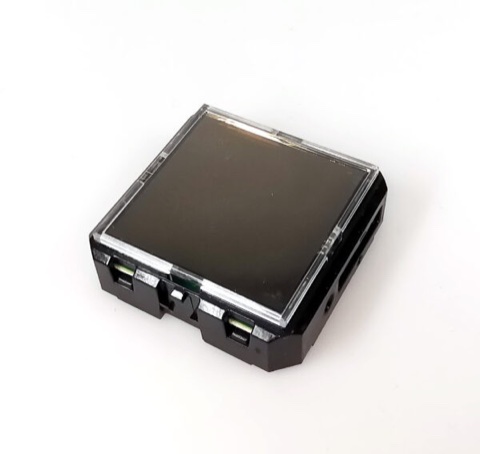
EnOcean STM 550B solar-powered multisensor

STM 550B

Solar-powered multisensor, sending on a schedule and on change.

Factory-calibrated: EnOcean stores the calibration values inside the sensor, so there is nothing to adjust on site — ±0.3 K, ±3 % r.h., light ±10 % per EnOcean.

Reports temperature, humidity, illuminance, acceleration, magnet contact, energy store
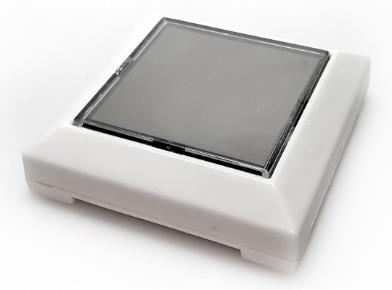
EnOcean EMSIB Easyfit BLE multisensor

EMSIB

The STM 550B with an Easyfit frame around it — the same module, ready to mount.

Reports the same telegrams as the STM 550B
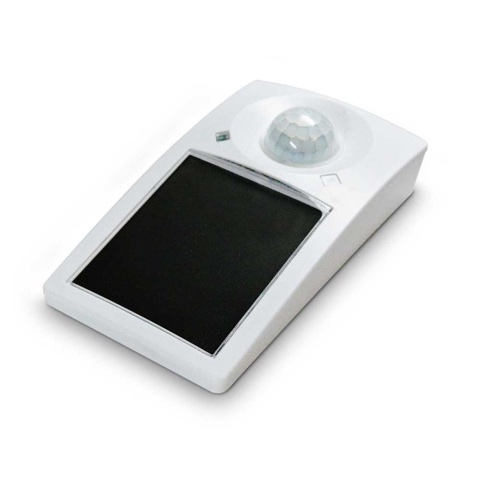
EnOcean EMDCB ceiling-mount motion detector

EMDCB

Solar-powered ceiling-mount occupancy sensor.

Factory-calibrated light sensing: EnOcean calibrates the solar cell at the factory and keeps the values in the sensor — ±5 % at full scale. Light on a desk surface still needs calibrating at the receiver.

Reports occupancy, illuminance, light at the solar cell, energy store

Product photos: EnOcean GmbH. Calibration and accuracy: EnOcean STM 550B user manual v1.5 (2023) and EMDCB user manual v1.8 (2021).

Bluetooth only. The gateway listens at 2.4 GHz. EnOcean’s 868 / 902 / 928 MHz products are a different radio and are not received.

Motion as the power source

Move it, and it reports.

Press, push in, plug in, pull out — the mechanical action itself is the power supply. An EnOcean kinetic harvester turns one movement into enough energy for one authenticated Bluetooth LE telegram, and the gateway collects it, merges the copies, adds signal strength and a missed-telegram count, and hands it to your network. No battery to change, no wire to run.
A movementA button, a latch, a hatch, an insertion or a removal — every press and every release is an event.
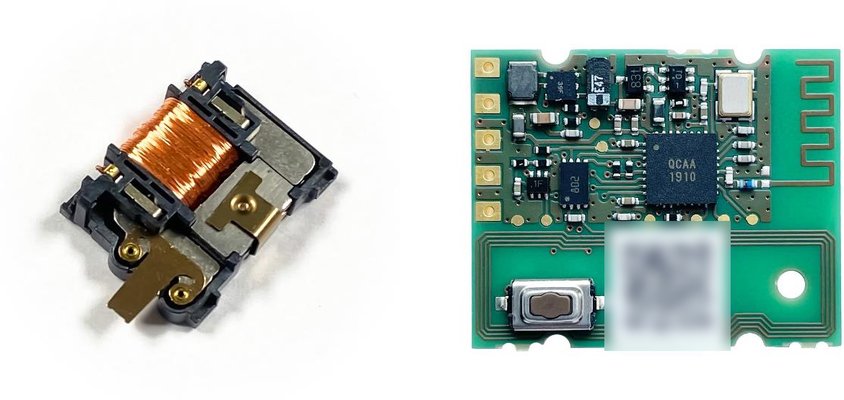
Energy from the springThe ECO 260 harvester converts the linear motion into electrical energy, on the way down and on the way back.
A signed telegramThe PTM 535BZ transmitter sends a Bluetooth LE telegram with AES-128 authentication and a sequence number.
Collected by the EdgeRouterJSON over UDP or TCP and Modbus registers from the BFi53ER0-BF, or mapped into Bluetooth Mesh by the BFi53ER0-MB.
EnOcean ECO 260 kinetic energy harvester beside the PTM 535BZ transmitter module with its printed antenna and learn button

ECO 260 + PTM 535BZ

EnOcean’s newest kinetic harvester and Bluetooth LE transmitter.

Harvester
29.3 × 19.5 × 7.0 mm, 8 g
Energy
120–210 µJ per press or release
Lifetime
typ. > 1,000,000 actuations
Transmitter
26.2 × 21.15 mm, integrated antenna, +4 dBm
Range
typ. 30 m line of sight, 10 m indoors (EnOcean)
Setup
NFC from a phone, or the learn button
Inputs
2 more signal inputs, e.g. a position contact

With the gateway Received on the bench as a single-key OneKey switch (firmware 0.57.42); EnOcean’s datasheet gives the same Bluetooth LE encoding as the PTM 215B, with AES-128 authentication and a sequence counter. On the BFi53ER0-BF the same press also appears as Modbus registers, or drives a terminal output directly.

Drones & mission equipment

  • Pre-flight and return checks at the pad or hangar: payload latched, battery hatch closed, arms locked — reported to your ground system as they happen
  • Powered by the motion itself: no wiring into the airframe and no draw on the flight battery

Robot dogs & ground robots

  • Many moving joints and hard cable runs
  • Wireless and battery-free fits best where wires cannot follow

Cartridges & removable modules

  • Insertion and removal are mechanical actions: each powers its own event
  • Count every unit in and out at check-in

Light

  • 8 g harvester; no battery weight or volume

Maintenance-free

  • No battery to change; typically more than a million actuations

Verifiable

  • Authenticated and numbered: a missed event shows up as a gap
Payload latch lockedBattery hatch closedArm unfolded and lockedRelease mechanism firedAccessory attached or removedService panel openedManual confirm buttonModule inserted or removed, with timeCheck-in count on return

Integration. EnOcean rates the PTM 535BZ for indoor use in dry rooms (−25 to +65 °C) and the ECO 260 for 0 to +40 °C (−25 to +65 °C under evaluation). Outdoor vehicles need a sealed housing and temperature and vibration qualification, and a metal airframe changes the radio range — measure on the actual vehicle. For a larger site, several collection points can report back over a DECT NR+ mesh through the BFi53ER0S; that is an architecture proposal, verified per project. Housing, mechanics and collector integration are available as engineering services.

Photos and figures: EnOcean GmbH — ECO 260 datasheet (March 2023) and PTM 535BZ datasheet (product preview, May 2021).

Solution built on this gateway

Assistive Help Call for Care, Healthcare & Schools.

Battery-free call buttons, plus the factory-calibrated STM 550B and EMDCB for room climate, presence and light — collected by one BFi53ER0 and handed to the nurse-call, security or building system. For long-term care homes, hospitals and clinics, kindergartens, schools and public places.

Nothing to wire, no batteries, nothing to calibrate on site

The button is powered by the press and the sensors by room light, and the sensors leave EnOcean’s factory calibrated. See the Assistive Help Call solution →

Measured

Performance and capacity.

Figures from a working unit on the bench, except where marked as a planning figure.

Heard → handed to the network46 ms on average, measured (firmware 0.57.43). Each telegram first waits for its repeat copies — 44 ms on average, 61 ms at most measured — so it goes out once, with the count of copies; the live view does not wait
Delivery19 of 19 telegrams arrived on both IPv4 and IPv6; 24 telegrams in two rapid bursts, none missing
TCP feed catch-up22 of 22 telegrams missed during a disconnection delivered on reconnect, in order (microSD fitted)
Live viewShows each telegram the moment it is heard, ahead of UDP and TCP
Web pages, served compressedLive view 6.9 KB in 20 ms; settings pages 12.9 KB in 32 ms
ModbusUp to 32 Modbus TCP masters at once, about 400 requests/s shared evenly, no errors; a cached RS-485 read answers in about 2 ms, against about 43 ms reading through to the bus at 9600 bit/s (firmware 0.57.82)
Devices per gateway256 sources tracked at once is a planning figure: when the table is full, the source heard longest ago gives up its slot, so no device is refused. Up to 48 of them named, placed and on an allow or block list is a firmware limit — the device table has exactly 48 entries. Both are set by the firmware’s tables; radio coverage and other 2.4 GHz traffic on the site usually limit first.
Status light

One colour for what the gateway is doing.

The light breathes one colour for the gateway’s state, most urgent first; the first that applies is shown. At power-up it checks each colour — red, green, blue, white, 1.2 s each — unless the light is switched off. Brightness is set from 0 to 100 %, or off, on the settings page; the update colours (magenta, and magenta / white) always show, at no less than 25 %. BFi53ER0-BF firmware.

ColourBreathMeaning
White1.2 sStarting
Magenta0.7 sFirmware being written — do not remove power
Magenta / white, fast0.25 s eachFirmware being written from the microSD card at start — do not remove power
Green, fast0.5 sFor 15 s: password or all settings reset with the reset button
Magenta / white, slow1 s eachThe image from the microSD card on trial; it keeps itself after 2 minutes — do not remove power
Red3 sNo network address
Blue, fast1 sBluetooth open for a firmware update
Amber3 sCapturing; microSD recorder off (no card, or the card failed)
Cyan4 sCapturing and recording, and a TCP feed client is connected
Blue4 sCapturing and recording
Green flash0.2 s, onceA telegram was heard (over any state)
Hardware

The EdgeRouter, running the gateway firmware.

Runs on either model, powered by PoE+ or 14–32 V DC, DIN-rail or wall mount. Field interfaces on the BFi53ER0 terminal block: RS-485, two 0–10 V analog inputs and outputs, four digital outputs and two digital inputs. BFi53ER0S: terminal assignment to be announced. Made in Taiwan by BANFi Semiconductor.
Documents

Quick Start cover
Download · PDFQuick Start

What the gateway does, a first installation, the status light, the live view, and integration at a glance — ports and the Modbus register blocks in outline.

BFi53ER0-BF firmware 0.57.82 · v1.8 · 9 pages
Hardware specification cover
Download · PDFHardware specification

BFi53ER0 / BFi53ER0S: block diagram, terminal layout, SWD debug header, electrical, mechanical, certification and ordering.

FLS-HS-ER0 v3.2 · 11 pages
Python 3
Download · ZIPExample code

Receive every telegram over UDP, read the TCP feed with catch-up, and make a first Modbus TCP read — standard library only, free to use, copy and modify for BFi53ER0 integration.

3 programs + README · v1.1
Manuals
Download · short form
  • User ManualInstallation, every settings page, Modbus TCP, RS-485, the terminals, rules and alerts, time and history, backup, updates and troubleshooting — now a direct download. v3.6 · 58 pages.Download ↓
  • System Integration GuideJSON payload decoding, the complete Modbus register map and command reference. Leave your company details and we send it.Get the guide →
Next step

Put one on your network.

Tell us which devices and how many, what should receive the telegrams, and which Modbus masters or RS-485 equipment are on the site. We will send the product specification and arrange a unit.

BFi53ER0 and BFi53MLG are products of BANFi Semiconductor Co., Ltd. (Taiwan); FL Semiconductor LLC is the point of contact in North America. EnOcean, PTM, STM and Easyfit are trademarks of EnOcean GmbH. Bluetooth is a trademark of Bluetooth SIG, Inc. Modbus is a registered trademark of Schneider Electric, licensed to the Modbus Organization, Inc. Nordic Semiconductor, nRF5340, Arm, Cortex, TrustZone and CryptoCell are trademarks of their respective owners.